Published: June 23, 2026
Updated: June 23, 2026
In this blog post, RAZ Mobility identifies and reviews some of the best cell phones for the elderly. We examine the phones based on three criteria: (1) ease of use, (2) loudness of the audio, and (3) clarity and contrast of the text for individuals with vision loss. All three of these characteristics are essential for seniors.
Concerning ease of use, we are looking for a simple menu system with as few “sub-menus” as possible, larger buttons or icons, and easy-to-use apps if apps are included.
The speakers should be loud, helping the elderly hear as well as possible when calls are placed on speakerphone.
Many seniors are visually impaired. Accordingly, we want a phone with good contrast and large text.
The four cell phones reviewed in this article are the RAZ Memory Cell Phone, the Jitterbug Smart4, the Jitterbug Flip2, and the Consumer Cellular IRIS Flip. The Jitterbug Smart4 is designed to be an easy-to-use smartphone. In contrast, the Jitterbug Flip2 and Consumer Cellular IRIS Flip are traditional basic cell phones featuring large buttons and user-friendly menu systems. On the other hand, the RAZ Memory Cell Phone is unique in that it is designed primarily for the elderly with cognitive decline.
Each cell phone is reviewed in turn. We hope that you find the reviews instructive!
Our four best cell phones are the following:
- RAZ Memory Cell Phone
- Jitterbug Smart5
- Jitterbug Flip2
- Consumer Cellular IRIS Easy Flip
- Comparison board
Because of its thoughtful characteristics and unique abilities, we consider the RAZ Memory Cell Phone the best overall for the elderly. It is also the only device that is unlocked and can be used with any wireless provider.
The RAZ Memory Cell Phone – Simplest and Best Cell Phone for Seniors Overall in 2025

RAZ Mobility sells the RAZ Memory Cell Phone. The company specializes in mobile devices, including cell phones and applications for people with disabilities. It sells to government agencies across the country and directly to consumers.
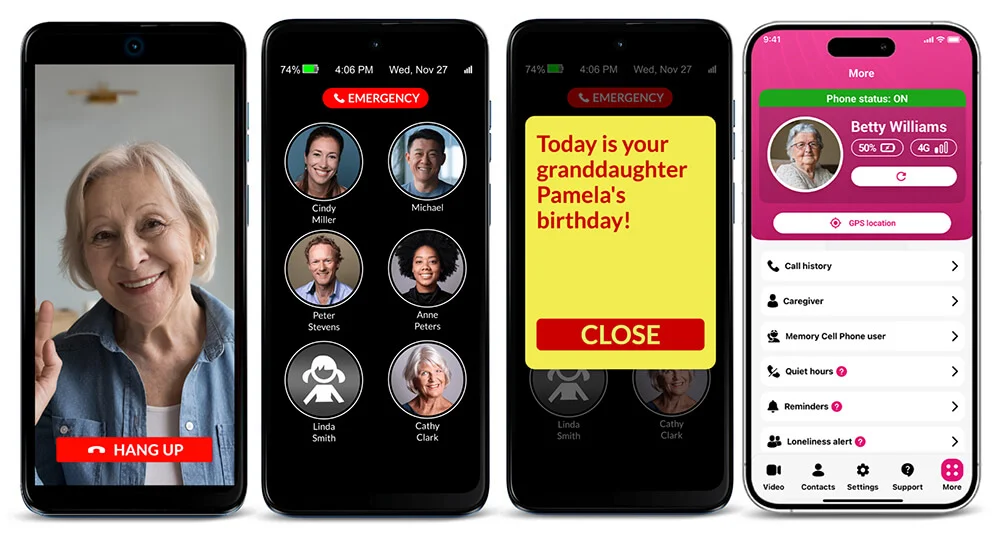
The RAZ Memory Cell Phone is unique. Unlike the other cell phones on this list, it is designed for seniors with cognitive decline. No cell phone is easier to use. The phone only supports voice and video calls. Text messaging, email, web browsing, and other capabilities are unavailable. Also, unlike the other phones, the RAZ Memory Cell Phone can be controlled remotely by family caregivers. This is particularly useful if the senior lives in a different city than a son or daughter who wants their parent to have a cell phone.
Further, unlike the other phones and companies on this list, RAZ Mobility participates in the AARP’s AgeTech Collaborative and won the Collaborative’s 2022 Connect and Thrive pitch competition.
Physical Description of RAZ Memory Cell Phone for Seniors
The RAZ Memory Cell Phone looks like many other smartphones. It has a large 6.5-inch display with narrow bezels. Since it looks like other smartphones, seniors will not feel self-conscious about having a “special” phone.
The phone’s top edge includes a 3.5mm headphone jack. The power button and volume rocker are located on the right edge of the phone. The SIM card slot is on the left edge. The bottom edge has a USB Type-C port for charging the phone.
The display is bright and easy to see. To conserve battery power, the phone dims slightly when it has been idle for 2 minutes. However, even when dimmed, the screen contents are clearly visible. The screen brightens as soon as the user touches the dimmed display.
The battery cannot be removed or replaced, which is typical of smartphones now.
Accessories that can be purchased separately include a standard protective case, a protective case that blocks the power button and volume rocker, a wallet case, a 6.6-ft charger cable, a pouch with a belt clip, and an emergency contact information tag that attaches to the phone and includes basic information, such as name, an emergency contact number, and medical conditions. Importantly, two options for wireless charging sets are also available, which are great for the elderly with low vision, hand tremors, or arthritis.
Only Cell Phone for Seniors with One Primary Screen – Easy to Use
The menu system could not be more straightforward because there is no menu system! The RAZ Memory Cell Phone features a single screen displaying contacts as pictures with names underneath. That’s it. The senior has no additional options. The pictures assist individuals with memory loss. The senior taps & holds the picture of the person they wish to call, and the call is initiated.
By default, the screen accommodates up to six contacts (all six contacts appear on the same screen; no scrolling is required to reach a contact). But the number of contacts can be expanded to up to fifty. If this option is selected, the senior must scroll through the contacts until they see the picture of the person they wish to call.
The single screen also has an optional button to call emergency services. If this option is activated, the senior does not have to dial 9-1-1. They touch and hold the button. If activated, a pop-up asks the senior if they wish to contact emergency services. If they tap yes, the emergency call is initiated. If they press no, the emergency call is canceled.
To further simplify the phone, the volume button is disabled and set to maximum so that seniors cannot inadvertently silence it. The screen does not lock or go to “sleep.” The power button can even be disabled if the senior has difficulty turning the phone back on.
The RAZ Memory Cell Phone includes video calling. Contacts can video call the senior through the RAZ Care app. And video calls and voice calls are answered in the same way, making it especially easy for the elderly to participate in video calls.
Additionally, caregivers can provide their seniors with access to text messaging. The text message feature is designed to be exceptionally intuitive. It has some unique features, including the ability of caregivers to limit text messaging to contacts only, the option for a “super-simple” keyboard that makes voice typing easy, and the option to have incoming messages read aloud.
Caregivers Manage the RAZ Memory Cell Phone for Seniors through the RAZ Care App
The RAZ Memory Cell Phone is remotely managed through a simple app.
The caregiver uses the app to add and edit contacts, including uploading pictures. The caregiver can also manage many unique settings explicitly designed for the elderly, including but not limited to the following:
- Limit incoming calls to contacts to prevent unwanted telemarketing or scam calls.
- Automatically answer calls – the senior doesn’t have to press the answer button.
- Caregiver(s) can receive a text message alert when the phone’s battery is below a specified level.
- Caregiver(s) can be notified by text message when the senior calls 911.
- Seniors can receive a reminder to charge when the battery is low.
- The phone will say “phone charging” when it starts to charge.
- An option for a keypad symbol appears at the display’s bottom.
- An option for a keypad to appear automatically when the user dials a toll-free number to allow the senior to navigate the automated phone system.
- The display can include a voicemail button to provide easy access to voicemail.
- The display can be adjusted to make the contacts, answer, and hang-up buttons much larger for seniors with low vision or hand tremors.
- Option to show the day of the week, month, and date in the status bar.
- Seniors can be notified of missed calls.
- To reduce social isolation, caregivers can receive an alert when the senior does not participate in the desired number of phone calls.
- The ability of caregivers to control seniors’ repetitive calls to the same contact within a short period of time.
- Block calls during certain times of the day, such as the middle of the night.
- Caregivers can send the senior reminders.
The app also provides caregivers access to the signal strength, remaining battery power, and the phone’s GPS location. This allows the caregiver to warn the senior that they are low on power and need to charge the phone or track the senior if they wander and need to be located. The caregiver can even see whether the phone is in the process of being charged and whether it is powered on or off.
Caregivers can also send reminders to seniors and set up “quiet hours.” During these hours, the senior cannot place calls to designated contacts. This feature can be significant for seniors with dementia who habitually call in the middle of the night.
If the caregiver is concerned that their senior is lonely, they can set up “loneliness alerts.” When activated, the caregiver sets a target for the number of calls in which the senior should participate. For example, the target might be two calls per day. The caregiver will receive a text message if the target is not satisfied, encouraging the caregiver to ensure that the senior participates in more calls, thereby reducing loneliness.
In short, the app and portal provide the caregiver with complete control over the RAZ Memory Cell Phone from anywhere in the world. On the other hand, the senior has no control or access to settings. This is done so that the caregiver assumes the complexity while the senior experiences maximum simplicity.
The RAZ Memory Cell Phone Includes a Unique Emergency Service for the Seniors
RAZ Mobility offers an optional emergency service. The service is designed for cases where users imagine emergencies and frequently call 911, needlessly tying up emergency resources. Emergency calls are directed to a private emergency dispatch agent rather than 911 with the service. The agent knows that the caller has memory loss or other medical conditions and will determine whether to contact 911 guided by this knowledge. Also, when a senior calls the emergency service, up to three caregivers will receive text messages, allowing them to cancel the emergency alert and prevent unnecessary calls to 911. The service costs $99.99 annually. In the alternative, it costs $9.99 monthly with a one-time activation fee of $19.99.
Loudness of Audio for Hearing Loss – a Critical Feature for Cell Phones for Seniors
We tested the RAZ Memory Cell Phone’s loudness with a sound level meter. The phone’s earpiece’s loudness during a regular conversation is 87.1 dB, which is very loud and just a hair below the Jitterbug Smart4’s 87.4 dB.
The loudness of the speakerphone is fantastic—it is by far and away the loudest speakerphone among the four (4) phones reviewed, at an impressive 125.6 dB. By comparison, the Jitterbug Smart4 is in second place at 106.8 dB. The audio quality of the speakerphone was also excellent. Many seniors prefer calls on speakerphone. Accordingly, the loudness and high quality of the RAZ Memory Cell Phone’s speakerphone are essential considerations.
Clarity and Contrast of Text for Vision Loss
The RAZ Memory Cell Phone’s background is black by default. Each picture is presented as a circle approximately 1 inch in diameter, so the pictures are large for individuals with low vision. The names underneath the pictures are white, providing excellent contrast with the black background.
The caregiver can change the background to white if the low-vision senior prefers black on white.
In addition, there is a special low-vision mode. With this mode activated, instead of six (6) contacts per page, there are only two, and the contacts will be much larger, making them significantly easier for the senior to see. The caregiver can also customize the contact icons by selecting the color schemes. For example, the names of the contacts can be in yellow, and the background can be black.
The RAZ Memory Cell Phone is well-suited for visually impaired seniors due to its large pictures or icons and excellent contrast.
RAZ Memory Cell Phone Price and Wireless Service
The phone costs $369.00 and works with Verizon, AT&T, and T-Mobile. In other words, the phone can be used with just about any wireless provider, including wireless resellers such as MINT Mobile, Ultra Mobile, Straight Talk, Net10, Cricket Wireless, Consumer Cellular, and Metro by T-Mobile. This phone also comes with a free SIM card and three (3) free months of service from Affinity Cellular, which operates on the Verizon network. After the free service, the cost is $25 per month. For more information, click here or call 1-800-729-0083.
RAZ Dementia Helpline
RAZ Mobility offers its customers a free dedicated dementia helpline. Customers can receive one-on-one over-the-phone support: (1) for managing dementia-related behaviors, (2) communication strategies you can use right away, (3) emotional support for caregiver stress and burnout, (4) education on Alzheimer’s disease and other dementias, and (5) general information about Medicare, Medicare Advantage, and supportive programs. This unique service is available only to RAZ Mobility customers.

Jitterbug Smart5 – A Smartphone for Seniors
The Jitterbug Smart5 is sold by Lively, and is designed to be a modestly simplified but powerful smartphone. Users have full access to mobile applications, settings, and other advanced features available in smartphones.
Physical Description of Jitterbug Smart4 smartphone for Seniors
The Jitterbug Smart5 looks like a modern smartphone. The display is a generous 6.75” and has a small “teardrop” cutout at the top to accommodate the camera. The right edge includes the volume rocker and power button. The left edge includes a SIM card tray. The top edge has a microphone and earpiece speaker, while the bottom edge includes a speaker, another microphone, the USB charging port, and a headphone jack. The rear of the phone has a camera setup. The device’s color is steel blue, and it has a premium look and feel.
A Unique Menu System and User Experience for Seniors
The Jitterbug Smart5 is designed to be an easier-to-use smartphone. It accomplishes this through a customized menu system, a simplified Settings app, and easy access to how-to guides.
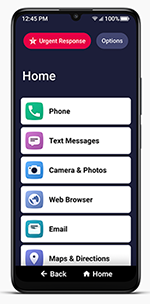
The menu is list-based, allowing users to navigate the phone more intuitively. On the other hand, the majority of the apps themselves are standard Android apps. For example, if the senior wants to surf the internet, they must use Google Chrome; if they wish to send or read an email, they must use an email client like Gmail; if they want to navigate while driving, they use Google Maps; to view pictures, the senior uses Google Photos, if they wish to place a video call, they must use a video calling app, such as Google Meet … etc. Therefore, if the senior has difficulty with standard apps, the Jitterbug Smart5 will not solve that problem. On the other hand, if they have difficulty navigating their phone generally, the list-based menu system could be an elegant solution.
Navigating the phone is also made easier by simple Back and Home buttons at the bottom of the display.
Two custom-designed apps for the Jitterbug Smart5 are the Phone and Settings apps. The Phone app is thoughtful and includes a well-designed dial pad with high contrast. The Settings app intuitively organizes various settings and excludes settings less likely to be used by seniors, making it easier to find what you need. If necessary, the senior can access “Advanced Settings,” which are simply the Android settings.
The Jitterbug Smart5 makes it easy to access Lively services. This includes access to Lively’s Urgent Response service, Lively Rides, Ask Lively, Nurse On-Call, and Care Advocate. Lively explains that “[f]rom everyday questions to emergencies, we can get you the help you need.” Some seniors will find these services valuable. The services cost either $19.99 (the Preferred package) or $29.99 each month (the Premium package). The Preferred package includes the Urgent Response service, Ask Lively, and use of the Lively Link app. The Premium package provides everything in the preferred package, plus access to the Nurse On-Call and Care Advocate services.
The Jitterbug Smart5’s battery is 5,010 mAh, which is very good. The Jitterbug Smart5 does not offer a wireless charging option, which may be relevant if the senior has difficulty charging their cell phone with a cable. The cell phone has 128 GB of memory and 8 GB of RAM, which delivers the performance of a mid-tier smartphone, more than enough for most seniors.
The Cell Phone’s Loudness of Audio for Hearing Loss Experienced by Seniors
The phone’s earpiece’s decibel reading was 89.5 dB, and the speakerphone’s reading is 110.6 dB, making it a strong performer in this category.
Clarity and Contrast for Vision Loss
The menu system has excellent text size and contrast. The characters are bold and large, with a black-on-white color contrast. In standard applications (e.g., Google Maps), the text size and contrast are the same as on any smartphone.
Jitterbug Smart5 Smartphone for Seniors Price and Wireless Service
The Jitterbug Smart5 costs $119.99.
The phone must be used with the Lively wireless service. Lively offers competitively priced wireless service, which costs $19.99/month for unlimited talk and text and 1 GB of data; $24.99 for unlimited talk, text, and 5GB of data; $34.99 for unlimited talk, text, and 10 GB of data; and $49.99 for unlimited talk, text, and 10 GB of data. Lively charges an activation fee of $35.00. International calls typically cost $1.35 per minute.
Customers are charged $0.10 for each MB beyond the purchased amount. To avoid unexpected charges, customers can call to set a data limit stop.
If the user needs a ride, they can call Lively, and they will arrange one through Lyft. The customer will see the cost of the ride on their monthly invoice. This is a valuable service for seniors who find it difficult to use ride-share apps and arrange rides.
Service is provided over the Verizon network.
The Jitterbug Smart5 is a good option for seniors who benefit from a vertical menu configuration, want easy access to Jitterbug services, and have the cognitive ability to use standard Android applications.
The Jitterbug Flip2 – Best Flip Phone for Seniors
Like the Jitterbug Smart4, the Jitterbug Flip2 is manufactured and sold by a wireless provider called lively. Lively specializes in serving the elderly and offers several solutions, including cell phones, aimed at this demographic.
Physical Description of Jitterbug Flip2 Cell Phone for Seniors
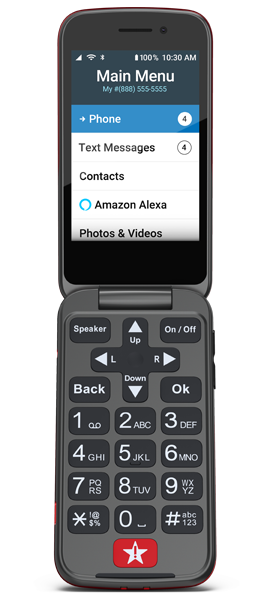
The Jitterbug Flip2 is a nice-looking flip phone that fits well in the hand. It has a plastic exterior and a red metallic color. It measures 4.3 inches in height, 2.19 inches in width, and 0.75 inches in thickness. It feels solid and generates a nice-sounding thud when closed.
On the front panel of the phone’s exterior are a camera, an LED flash, and a notification LED that flashes to notify seniors of a voicemail or emergency alert. There is also an outside screen that displays the time, day, date, and some status information, such as the battery and signal strength.
The volume rocker is on the right edge. A 3.5 mm jack for headphones and the charging port is on the left edge. On the bottom edge are the microphone and the charging dock connectors. The speaker is on the back of the phone.
If you flip open the phone, the top half includes a 3.2-inch display and the earpiece speaker. The bottom half consists of the keypad and urgent response button. Unfortunately, the keypad is not tactile, making it challenging for seniors with vision loss, who rely to some degree on feel.
The Jitterbug Flip2 includes a convenient charging station, which makes it especially easy for seniors to charge their cell phone. The charging station has a nice sturdy feel to it, and the rubber on the bottom grips surfaces nicely.
The battery of the Jitterbug Flip2 is 1780 mAh and advertises up to 12 hours of talk time. On the other hand, the RAZ Memory Cell Phone has a battery with 4000 mAh and advertises up to 46 hours of talk time.
The Senior Cell Phone’s Menu System
The menu system consists of vertical lists, which are easy to navigate and well-organized. The cell phone has a few features that make it easy to use. However, the menu system does go three levels deep in places, which likely makes it too difficult for many seniors with dementia and other cognitive challenges. Moreover, the contacts do not include pictures, again making it challenging for the elderly with dementia.
The main menu items consist of Phone, Text Messages, Contacts, Photos and Videos, Help Tools, Device Info, Settings, and Games. The Help Tools include a flashlight, magnifier, clock, calculator, FM Radio, and Mobile Support. As you can see, the phone is quite basic, which is generally a positive for seniors.
The Jitterbug Flip2 does not support video calls.
The magnifier is a nice feature for people with vision loss.
The Jitterbug Flip2 does not have a feature comparable to the RAZ Memory Cell Phone’s Remote Manage, which allows caregivers to manage all phone features from afar through an app. Accordingly, the senior must be able to operate the phone independently.
The Jitterbug Flip2’s battery is 1,780 mAh, which is reasonable for a basic flip phone. Not surprisingly, it does not include wireless charging, which is offered only in certain smartphones.
The Cell Phone’s Loudness of Audio for Hearing Loss Experienced by Seniors
The earpiece’s decibel reading during a test conversation was 78.5. This is perhaps a little louder than a typical smartphone, but not materially louder.
On the other hand, the decibel reading of the speakerphone during a test conversation was 104.4; this, too, is somewhat louder than a typical smartphone.
Accordingly, lively’s claim that the Jitterbug Flip2 has powerful speakers is justified, although the supported volume level is certainly not exceptional. Moreover, we found the sound quality lower than on an average smartphone, which may be a problem for the elderly with hearing loss who require clear sound.
The phone is compatible with hearing aids.
Clarity and Contrast for Vision Loss
The text is black on white, and the contrast is excellent. There is no option for switching the color scheme to white on black, although the text size can be “regular” or “extra large.”
Jitterbug Flip2 Cell Phone for Seniors Price and Wireless Service
The regular price of the Jitterbug Flip2 is $79.99.
Unlimited talk and text costs $19.99 monthly, and Lively charges a service activation fee of $35. No data is required
If the user needs a ride, they can call Lively, and Lively will arrange one through Lyft. The customer will see the cost of the ride on their monthly invoice. While this is a nice service, it is not free; Lively understandably charges for the convenience.
Lively offers additional health and safety packages priced between $14.99 per month and $44.99 per month. The basic package, priced at $14.99 per month, includes access to the Ask Lively care team. No data plan is necessary.
Consumer Cellular IRIS Easy Flip Cell Phone for Seniors

As the name suggests, the Consumer Cellular IRIS Easy Flip is sold by Consumer Cellular, a wireless provider focusing on the senior segment. Similar to the Jitterbug Flip2, it is a basic cell phone with buttons.
Physical Description and Battery of the Cellular IRIS Easy Flip Cell Phone for Seniors
The IRIS Easy Flip is similar in size and appearance to the Jitterbug Flip2. It has a plastic exterior and is sold in black or red. It is 4.34 inches high, 2.24 inches wide, and 0.79 inches thick. It feels solid and generates a nice-sounding thud when closed.
The cell phone’s exterior front panel includes a camera. Unlike the Jitterbug Flip2, the IRIS Easy Flip does not have a notification LED to notify users of a voicemail or emergency alert. However, notifications have a notification sound, vibration, and text on the outside screen. The outside screen also displays time and status information, such as the battery and signal strength. It does not display the day of the week, date, or month.
The phone’s left edge has a charging port and a physical button for snapping a picture. It uses USB Type-C and a directionless charging cable. The right edge includes the volume rocker. The speaker is on the back of the phone, the same as the Jitterbug Flip2. There is no charging station.
If you flip the phone open, the top half includes a 2.8-inch display and the earpiece speaker, while the bottom half includes the keypad and microphone.
The IRIS Easy Flip has very good battery life. Its 2,000 mAh battery provides approximately seven hours of talk time and 14 days of standby time.
Menu System – Not the Easiest for Seniors
The IRIS Easy Flip includes the following features:
- Contacts
- Text messages
- Call history
- Calendar
- Camera
- Photo Gallery
- Music player
- Internet browsing
- Clock
- Recorder
- FM Radio
- Calculator
The apps are basic but not always intuitive or easy to navigate. For example, if users want to delete a character they’ve typed, they must press the Power/End button; no button says “delete.” This lack of intuitiveness means that the phone is not an excellent option for those with cognitive decline, such as dementia.
In addition, the cell phone does not support voice typing, so seniors must learn to use the T9 keypad, which may be difficult for many. As a result, many seniors will be unable to use the text messaging feature or other features, such as entering a contact or creating a calendar event.
One handy feature is the Favorite Contacts button. It enables the elderly to access important family members or friends quickly.
Loudness of Audio for Seniors
The earpiece’s decibel reading is 86.3 dB, which is slightly less loud than the RAZ Memory Cell Phone and the Jitterbug Smart4, but louder than the Jitterbug Flip2.
On the other hand, the speakerphone’s decibel reading during a test conversation was 111 dB, which is impressive and much louder than that of the Jitterbug Flip2 and Jitterbug Smart4 speakerphones. However, it is not as loud as the RAZ Memory Cell Phone, which is the loudest.
The IRIS Easy Flip is compatible with hearing aids, making it a good choice for individuals who wear hearing aids.
Clarity and Contrast for Seniors with Vision Loss
The display supports color and occasionally presents text in white on black or black on white, which provides good contrast. At other times, it presents text as white on light blue or another color combination, which provides average contrast. Unfortunately, the user cannot change the color scheme.
As is typical for a flip phone, the display is not particularly sharp. It is not as sharp or bright as the RAZ Memory Cell Phone or Jitterbug Smart4; it is comparable to the Jitterbug Flip2.
The font size can be enlarged, but it would be even more helpful if it could be made even larger. The font size on a standard smartphone can be larger than the font size on the Iris Easy Flip.
The IRIS Easy Flip is not recommended for seniors with significant vision loss.
Consumer Cellular IRIS Easy Flip Cell Phone for Senior Price and Wireless Service
The regular price of the Consumer Cellular IRIS Flip is $59.
The phone supports only physical SIM cards, not eSIMs. The SIM card is located behind the battery. It comes with a Consumer Cellular SIM card already inserted.
Consumer Cellular operates on the AT&T and T-Mobile networks. A plan with unlimited talk, text, and 1GB of data costs $20.00 per month, and each additional line costs $15.00 per month. AARP members receive a 5% discount on the monthly service fees.
4 Best Cell Phones for Seniors in 2025
Summary: Which Cell Phone Is Best for Seniors?
| Feature/Phone | RAZ Memory Cell Phone | Jitterbug Smart4 | Jitterbug Flip2 | IRIS Easy Flip |
| One-touch photo dialing | ✅ | ❌ | ❌ | ❌ |
| Block unwanted incoming calls | ✅ | ✅ | ❌ | ❌ |
| Remotely managed by caregiver | ✅ | ❌ | ❌ | ❌ |
| Video calls | ✅ | ✅ | ❌ | ❌ |
| Loud speakerphone (>120 dB) | ✅ | ❌ | ❌ | ❌ |
| Hearing aid integration | ❌ | ✅ | ✅ | ✅ |
| Wireless charging | ✅ | ❌ | ❌ | ❌ |
| Text messaging | ✅ | ✅ | ✅ | ✅ |
| Easy interface with no menus or apps | ✅ | ❌ | ❌ | ❌ |
| Emergency button | ✅ | ✅ | ✅ | ✅ |
| Works with all major carriers | ✅ | ❌ | ❌ | ❌ |
| Ideal for cognitive decline | ✅ | ❌ | ❌ | ❌ |
| Low Vision & Hand Tremor mode | ✅ | ❌ | ❌ | ❌ |
| Charging reminders | ✅ | ❌ | ❌ | ❌ |
Final Thoughts
If you want the simplest cell phone for seniors, especially those with memory issues, the RAZ Memory Cell Phone is unique. It balances ease of use for the senior with powerful tools for the caregiver.
Check out other helpful articles on cell phones:
-
- A Great Cell Phone for Parkinson’s, Hand Tremors, and Arthritis
- 4 Best Cell Phones for Seniors with Dementia or Alzheimer’s in 2026
- 4 Best Simple Cell Phones for Seniors in 2026
- 6 Top Cell Phones for People Who are Blind or Visually Impaired in 2026
- The Best Cell Phone for Stroke Victims in 2026
- Cell Phone or Landline: What is the best choice for seniors?
Learn about medical ID bracelets and our new RAZ Medical ID Bracelet here: